नेपाली

For accountants

For accountants: Tally’s way of keeping books — with the shop’s bills already in them.

Every bill at the counter, every supplier bill, every receipt is a double-entry voucher in groups and ledgers you know. Stock, balances and every report are worked out from the vouchers — never typed in, never out of step.

The books you know, a key away

  • Alt+D

    Day Book

    Every voucher of the day, or of any period.

  • Alt+T

    Trial Balance

    By group, with drill-down to the ledger.

  • Alt+P

    Profit & Loss

    With opening and closing stock, the way Tally shows it.

  • Alt+B

    Balance Sheet

    Including the difference in opening balances until it’s cleared.

  • Alt+O

    Outstanding

    Receivables and payables, bill by bill, with how old each bill is.

  • Alt+S

    Stock Summary

    Quantity and value by item, group and location.

  • Alt+V

    VAT & IRD books

    Sales book, purchase book, VAT summary, IRD bill view.

  • Alt+A

    Analytics

    This year against last, by BS month.

Month end, without the bag of bills

From the Day Book to the VAT return — in one sitting.

Real screens and the checks behind them, from the sample shop.

01

Kamala · Accountant

The Day Book is already written

Sales from the counter, purchases from the godown, receipts, payments, contra and journal vouchers — each numbered, each balanced. Posted vouchers can’t be edited: a mistake is cancelled and entered again, and the number stays used.

In Accura: Day Book
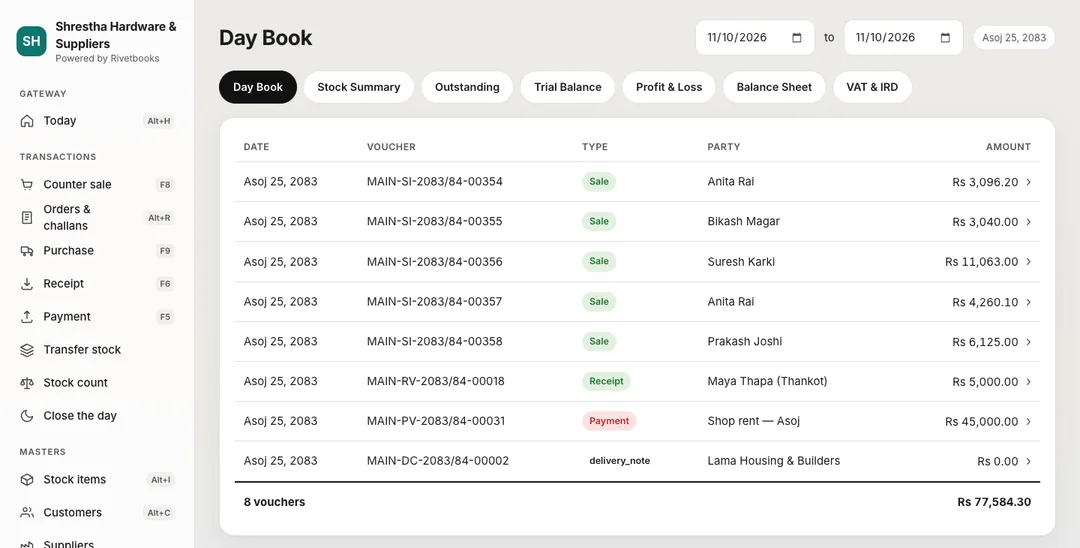
Accura Day Book for Asoj 25, 2083: sales vouchers, a receipt, a rent payment and a delivery challan, with numbers, parties and amounts.
Sample data Day Book — every voucher of the day, as an accountant expects it.

02

Kamala · Accountant

Sales book, purchase book, VAT summary

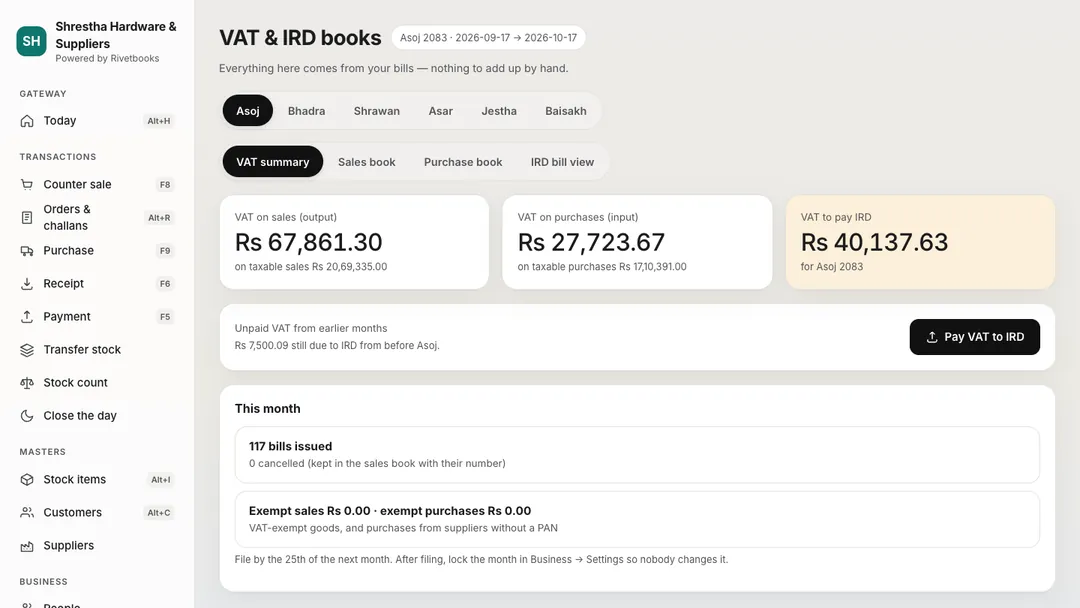
Month by month in BS. Cancelled bills show at zero and returns as minus; input VAT counts only where the supplier’s PAN is on the bill. The VAT summary carries credit forward from earlier months, and “Pay VAT to IRD” fills in the payment.

In Accura: Sales book and purchase book · VAT summary

Accura VAT & IRD books for Asoj 2083: the VAT summary with VAT on sales, VAT on purchases, unpaid VAT from earlier months, the VAT to pay and a Pay VAT to IRD button, with tabs for the sales book, purchase book and IRD bill view.
Sample data VAT & IRD books — VAT summary, sales book, purchase book and IRD bill view.

03

Kamala · Accountant

Fifteen checks before you sign off

The books health check recomputes everything independently: vouchers balance, movements sum to zero, stock was never below zero, party balances equal their open bills, the IRD sales book equals the ledgers, numbers have no gaps.

In Accura: Books health check

04

Kamala · Accountant

Tally in, Tally out

Moving a shop over? Import its Tally masters — groups, ledgers with opening balances and old bills, units, items with opening stock — with a preview that never overwrites. Still filing from Tally? Export masters and vouchers for a period as TallyPrime XML.

In Accura: Tally import and export

05

Suresh · Owner, with Kamala

Then the conversation the owner actually wants

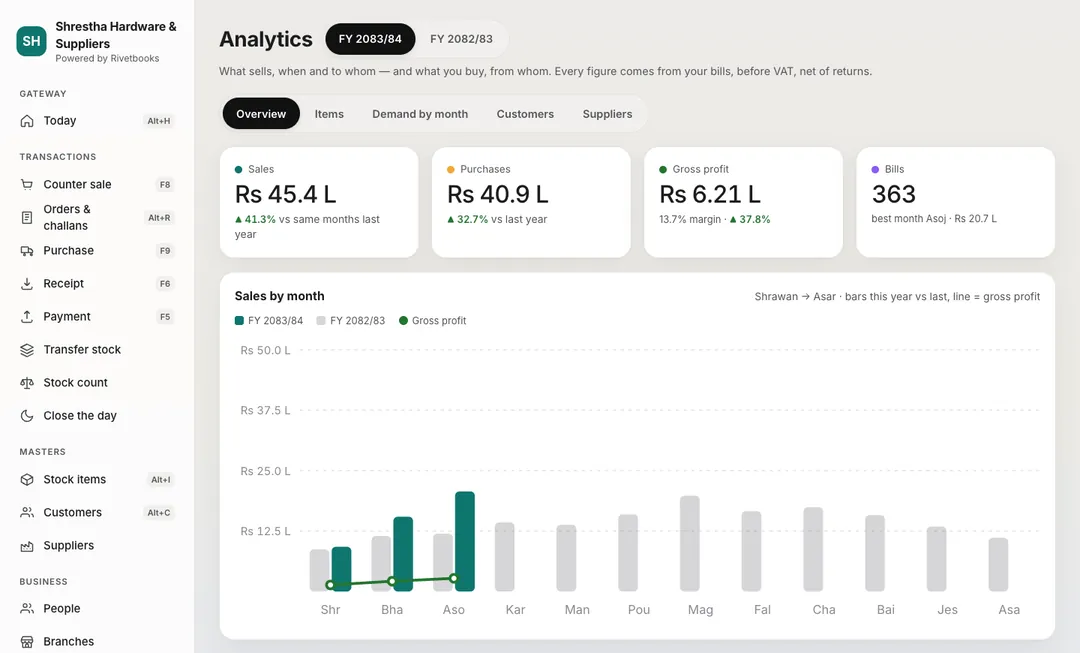
Sales, purchases and gross profit by BS month against last year, the best sellers and the slow movers — all from the same vouchers, so the numbers agree with the books.

In Accura: This year vs last

Accura analytics for fiscal year 2083/84: sales, purchases, gross profit and number of bills against last year, and sales by month this year against last year.
Sample data Analytics — this year against last, by BS month.

How the books stay right

  • Every voucher balances

    Debits equal credits, or the voucher is refused — by the database itself, not just the screen.

  • Posted means posted

    A posted voucher is never edited. Cancel it with a reason and enter it again; the number stays used.

  • Gap-free numbers

    Per branch, voucher type and fiscal year — and per offline counter PC.

  • Locked periods

    Lock a period and nothing can be posted into it.

  • Derived, never stored

    Stock, balances, outstanding and every report come from the vouchers each time.

Tally’s keys work here

KeyOpens
F8Sales (counter)
F9Purchase
F6Receipt
F5Payment
Alt+DDay Book
Alt+TTrial Balance
Alt+PProfit & Loss
Alt+BBalance Sheet

And the reports month end needs

  • Cash flow

    Money in and out of cash and bank by source, month by month across the BS year — opening + in − out always equals Cash + Bank.

  • Ageing

    Receivables and payables in not due / 0–30 / 31–60 / 61–90 / 90+ days per party, with totals that match Outstanding.

  • TDS & SSF report

    The month’s TDS by kind with every PAN, the deposit date and what is still to pay; SSF beside it.

  • Excel and Print / PDF

    Every main report to Excel, or printed clean on A4 with the shop, PAN and period at the top.

  • Import from Excel

    Items, customers and suppliers from .xlsx or .csv, headings in English or Nepali, with a preview first.

Your own login, for every shop you keep

The owner gives you the Accountant role. You open on the Day Book, see every branch, and file the VAT from the books — without anyone carrying bills to your office.

Open your business in Accura today.

Start on the free plan with one counter. Add your items, your udharo and your team when you’re ready — every feature is there from the first day.