नेपाली
Start free

Bills, udharo, stock and VAT — in one book.

A kirana in Kalanki, a hardware shop, a pharmacy, a mill in Banepa, a workshop that makes to order or a distributor with branches and godowns: bill in seconds, keep udharo with a limit, know what is on the shelf and in the godown, and hand your accountant books they already understand — kept the way Tally keeps them.

For every business in Nepal. Screens and figures show a sample shop.

Read a day at a kirana pasal

Choose your business

One Accura, set up for the way you work.

At sign-up you pick what kind of business you run. Accura starts with the units, menus and examples that fit — and any business can still switch on any feature.

Also for

  • Marts & supermarkets
  • Footwear & bags
  • Stationery & books
  • Cosmetics & beauty
  • Bakery & sweets
  • Meat, fish & dairy
  • Fruits & vegetables
  • Agro, seeds & vet
  • Furniture & home
  • Gifts, toys & sports

Pick yours at sign-up — it sets the units and examples you start with. You can change it later in Business → Settings.

Sound familiar?

Today the shop runs on a khata, a calculator and memory.

  • Udharo in a khata only you can read

    The hotel next door took ten bottles of oil last month — or was it twelve? The page is smudged, and they say they already paid half.

  • Prices in your head, the calculator by the till

    Per piece, per packet, per kilo, a little off for the regular — every bill is mental maths in the middle of the rush.

  • Stock you only know by walking to the godown

    “Is there any more in size 40?” Someone goes to look. The godown, the shelf and the register never quite agree.

  • VAT time means a bag of bills

    Every month the bill pads, supplier bills and a notebook go to the accountant, who types it all again into Tally.

What gets lost: who owes what, and since when, how much stock is really left in the godown, whether today’s cash matches today’s bills, and the input VAT on a supplier bill nobody filed.

A day at a kirana pasal

From shutter up to the VAT return — where Accura fits each part of the day.

One example shop: Shrestha Kirana Pasal in Kalanki, a general store with a shop floor, a godown and a few regulars on credit. A clothing shop, a pharmacy or a mobile shop will have different names and numbers; the shape of the day is the same.

The people in this story

  • Suresh ShresthaOwnerOpens the shutter. Wants to know who owes what.
  • AnitaCashierRuns the counter through the rush.
  • BikashStorekeeperLooks after the godown and the deliveries.
  • KamalaAccountantComes in twice a month. Files the VAT.
  • Dipak GurungRegular customerRuns Annapurna Kitchen, a small hotel — buys on credit every week.

An example shop — the names and figures are illustrative.

08:30Morning, 8:30

Suresh · Owner

The day starts with what needs you — not with the khata.

Suresh opens Accura on the counter PC while the shutter goes up. Wai Wai is below its reorder level on the shop floor. One of Annapurna Kitchen’s bills is past 30 days. Yesterday’s drawer was counted and came up Rs 100 short. Each line opens straight into the thing itself.

In Accura: Today · Reorder levels
11:00Late morning, 11:00

Anita · Cashier

Scan, pick the pack, print — next customer.

A canteen’s monthly order: a dozen bottles of oil, four cartons of noodles, tea and detergent. Anita scans what has a barcode and types the rest; Accura knows a carton is thirty packets and has its own price. VAT 13 % and round-off are worked out, the bill is over Rs 10,000 so it is a full TAX INVOICE with the buyer’s name, and it prints on the 80 mm printer with the amount in words.

In Accura: Counter sale · VAT · Tax invoice

13:15After lunch, 1:15

Dipak Gurung · Regular customer

The hotel’s weekly order goes on udharo — inside its limit.

Dipak wants the week’s rice, oil and spices for his kitchen on credit. Accura shows what Annapurna Kitchen already owes, bill by bill, and how old each bill is. The new bill fits inside the Rs 2 lakh limit, so it goes through; one that didn’t would be stopped at the counter. When he pays, the receipt is set against his oldest bills first.

In Accura: Credit limits · Bill-wise outstanding · Receipts

14:30Afternoon, 2:30

Bikash · Storekeeper

Twenty cartons from the godown to the shelf — on record.

The shelf is down to two cartons. Bikash moves twenty cartons of noodles, four dozen bottles of oil and fifty kilos of sugar from the godown to the shop floor. The transfer is numbered and moves the stock at average cost, so the counter now shows 22 cartons here and what is left in the godown.

In Accura: Godowns · Stock transfers

16:00Afternoon, 4:00

Bikash · Storekeeper

The distributor’s van arrives — and so does its bill.

Four hundred bottles of sunflower oil from Himal Traders. Bikash enters the supplier’s bill with their PAN, so the input VAT counts. The Rs 2,000 freight goes into the cost of the oil — Rs 250 a bottle landed, not 245. What the shop owes Himal Traders shows under payables, due in 30 days.

In Accura: Purchases · Input VAT · Landed cost

19:30Evening, 7:30

Anita · Cashier

Count the drawer before the shutter comes down.

Anita counts the notes and coins: Rs 84,520 in the drawer, Rs 84,620 by the books. The Rs 100 difference is recorded — with her remark, “change given twice” — instead of quietly disappearing. QR and bank payments are already in their own ledgers, so only the cash is counted.

In Accura: Close the day

MonthEarly Asoj

Kamala · Accountant

The accountant files the VAT — without a bag of bills.

Kamala signs in with her own Accountant login. Bhadra’s sales book and purchase book are already there, month by month in BS, with cancelled bills at zero. The VAT summary takes output VAT, input VAT and any credit carried in, and “Pay VAT to IRD” fills in the payment. Her Day Book and Trial Balance are the ones she knows from Tally.

In Accura: VAT summary · Sales and purchase books · Day Book

See every feature

See it working

Every screen your shop will use

Real screens from the sample shop — not drawings. Billing, udharo and cheques, the books — and, with the Wholesale tools on, online orders and made-to-order work.

Counter

Bill in seconds — at the right price for each customer

  • Scan or type; pieces, packets, cartons and loose kilos all work.
  • With the Wholesale tools on, retail, wholesale and contractor rates switch by themselves when you pick the customer.
  • Under each item: what this customer paid last time.
  • Cash, QR, bank, udharo — or split: part cash, part QR, the rest on credit.
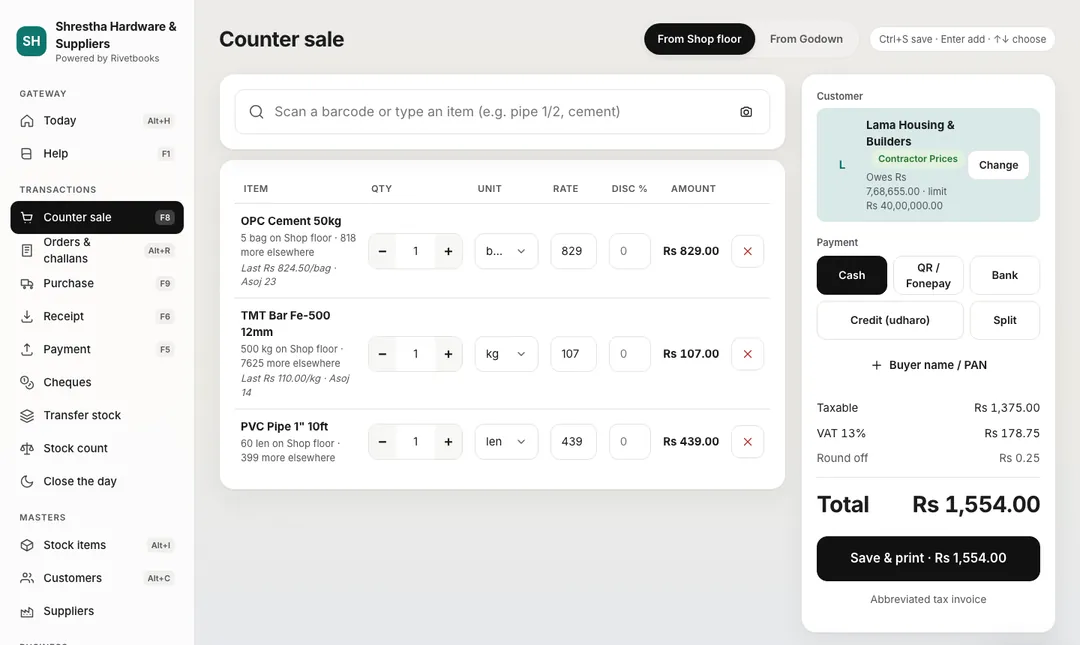
Accura counter sale for a regular customer on their own price level: three items, each with the price this customer paid last time, cash, QR, bank, credit or split payment, and a total of Rs 1,554.
Sample data The counter — the customer’s price level and what they paid last time, under every item.

Sell online

Your website takes orders — even made-to-measure ones

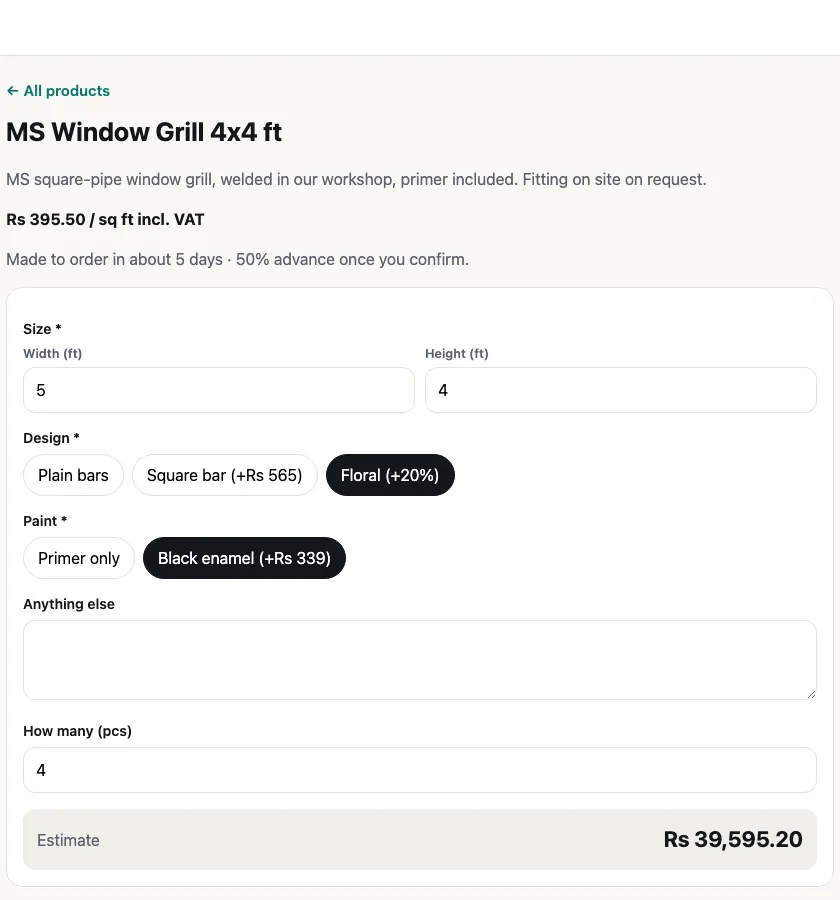
  • Items at a fixed price; furniture, curtains or custom work priced per sq ft, per length or on request.
  • The buyer picks size, design and finish and sees an estimate with VAT.
  • Their mobile is confirmed with a code — no fake requests.
The buyer’s page on the shop’s website: a made-to-measure item 5 × 4 ft with a chosen design and finish, 4 pieces, with an estimate of Rs 39,595 including VAT.
Sample data What the buyer sees — choose the size and design, see an estimate, send the request.

Online requests

Send a price, they confirm, it becomes an order

  • Each request lands in Orders & challans → Online (part of the Wholesale tools), and you get an email.
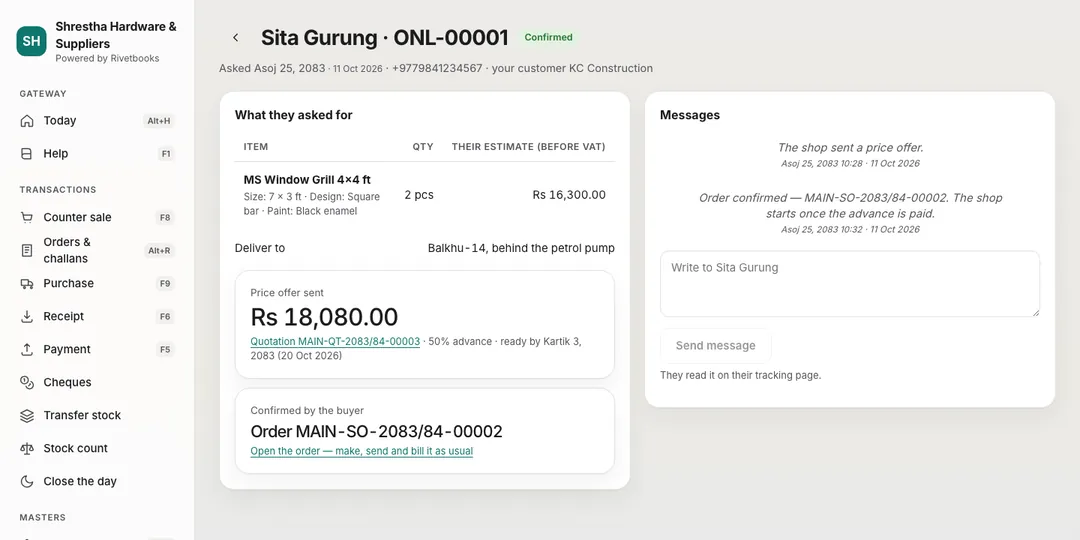
  • Send a price offer filled in from what they chose; message them on the same page.
  • When they confirm, it is a normal sales order — take the advance, make it, deliver, bill.
An online request in Accura: a made-to-measure item with its size and finish, the delivery address, the price offer of Rs 18,080 with 50 % advance, and the buyer’s confirmation as a sales order.
Sample data A request — send a price offer, message the buyer, and it becomes a sales order when they confirm.

Make to order

Know what a product really costs before you make it

  • A recipe per product — a cake, a sofa set, a gift hamper: the materials and the labour.
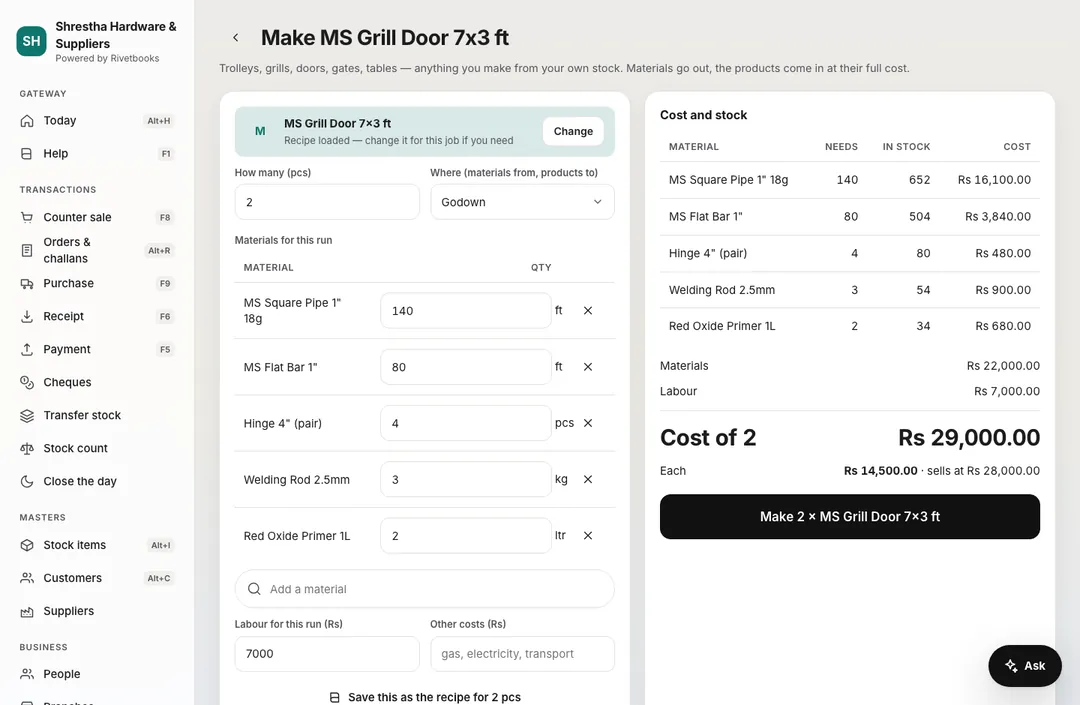
  • Make 2 → the materials leave the godown, the products come in at their full cost.
  • Short of a material? It tells you before you start.
Making two products in Accura: the materials taken from the godown, labour Rs 7,000, a cost of Rs 14,500 each against a selling price of Rs 28,000.
Sample data Make products — the recipe fills the materials; you see the real cost before you make it.

Udharo & cheques

Every rupee owed, every cheque waiting

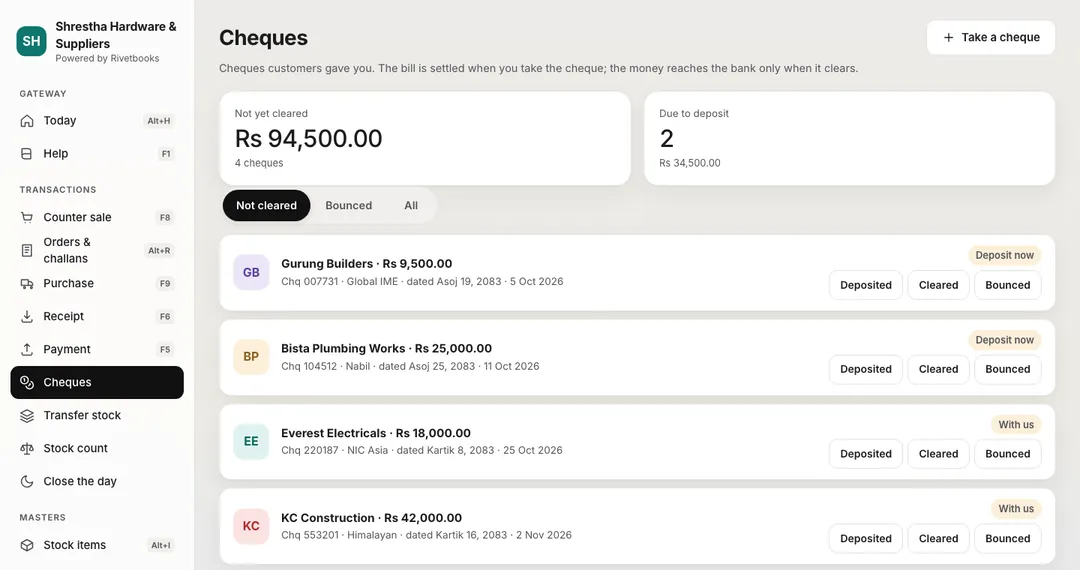
  • Post-dated cheques settle the bill now and wait here until the bank clears them.
  • A bounced cheque puts the amount back on the customer by itself.
  • An udharo reminder, ready in नेपाली or English — you send it by WhatsApp, Viber or SMS from your own phone.
Accura cheque register: cheques from customers not cleared yet, two due to deposit, with Deposited, Cleared and Bounced buttons.
Sample data Cheques — post-dated cheques wait here until they clear or bounce.

Books & VAT

Tally-style books and IRD registers, always up to date

  • Day Book, Trial Balance, P&L and Balance Sheet from every bill.
  • Sales and purchase books in IRD’s format, with Excel export.
  • Nepali dates first on every bill and report.
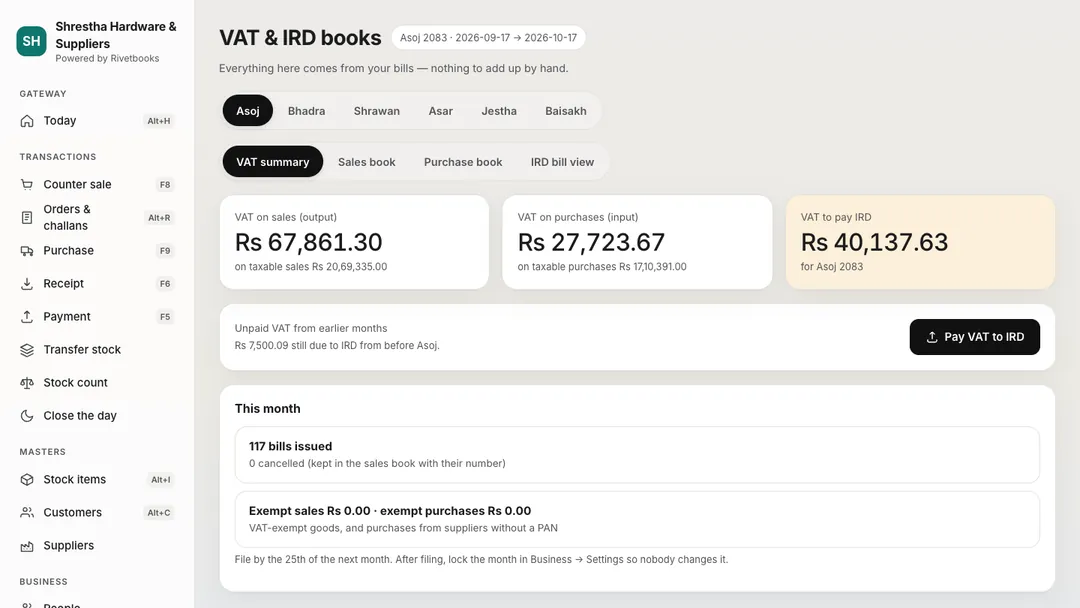
Accura VAT & IRD books for Asoj 2083: the VAT summary with VAT on sales, VAT on purchases, unpaid VAT from earlier months, the VAT to pay and a Pay VAT to IRD button, with tabs for the sales book, purchase book and IRD bill view.
Sample data VAT & IRD books — VAT summary, sales book, purchase book and IRD bill view.

On the counter PC too

Windows and Mac apps print straight to the receipt printer and keep billing when the internet drops.

Download the desktop app

IRD rules & trust

Every bill counted once, and never quietly deleted.

Accura follows the Inland Revenue Department’s rules for computerised billing — so the books you show an inspector are the books you kept.

  • Original once, then numbered copies

    The first print is the original. Every reprint says “COPY OF ORIGINAL - 1, 2, …”, and the print log keeps who printed it and when.

  • Cancel, never delete

    A wrong bill is cancelled with a reason and its number stays used. A return goes through a credit note against the bill.

  • Gap-free numbers per fiscal year

    Each branch — and each offline counter PC — has its own series, starting again every Shrawan.

  • Sales book, purchase book, VAT summary

    Month by month in BS, with the IRD bill view and a CSV of each.

  • Every user’s activity on record

    An activity log of who did what that nobody can edit — printable for an inspector.

  • Permissions checked on the server

    Each request is checked against the person’s role. Passwords are stored only as hashes; data is kept in Singapore.

Accura follows IRD’s computerised-billing rules. It is not IRD-certified yet, and it does not connect to CBMS.

Offline and on the desktop

Internet gone? Keep billing.

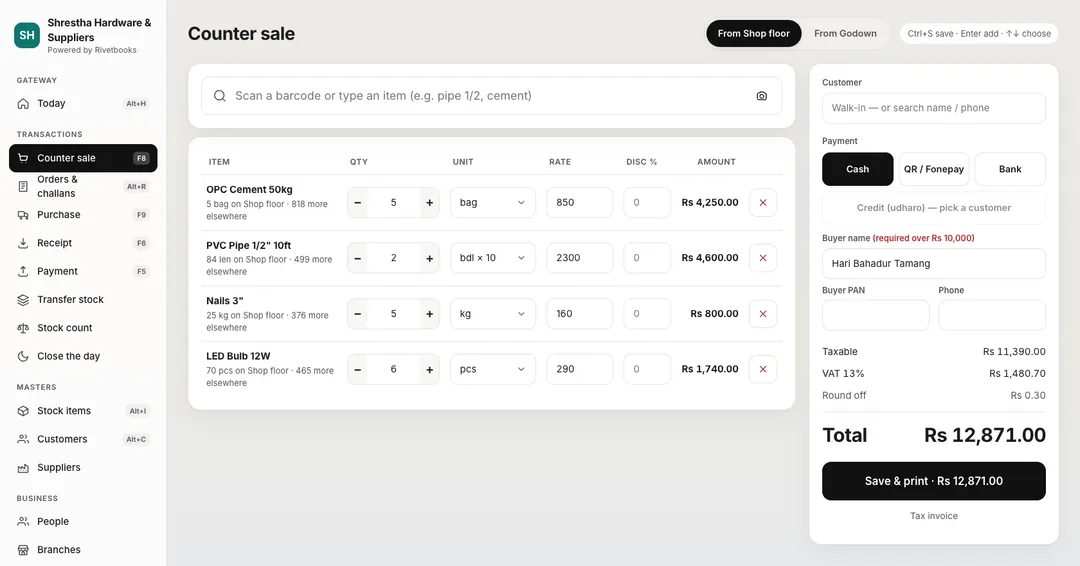
Register the counter PC once. When the line drops, it keeps billing cash and QR from its own gap-free series, prints as usual, and sends every bill the moment the internet is back — anything unusual is flagged for the owner.

Accura counter sale selling from the shop floor: items by the bag, by the bundle of ten, by the kg and by the piece, with taxable amount, VAT 13 %, round-off and a total of Rs 12,871 to save and print as a tax invoice.
Sample data The counter screen, and an abbreviated invoice printed while offline.
  • A desktop app for Windows and Mac runs the shop floor — counter, cashier and accountant — and prints straight to the receipt printer.
  • Everything else — people, branches, settings, Tally, the website — is in the web dashboard, from any browser.
  • No scanner? The camera on a laptop or phone reads barcodes too.

Built around Nepal’s rules

BS dates, VAT 13 %, PAN — already set up.

The things a generic billing app gets wrong are the things Accura starts with.

  • Available

    Bikram Sambat, fiscal year from Shrawan

    Every bill, book and report in BS. The year turns on 1 Shrawan, and bill numbers start again with it.

  • Available

    VAT 13 % and PAN on the bill

    VAT worked out on each line, round-off, the buyer’s PAN where needed — and input VAT only on supplier bills with a PAN.

  • Available

    Rupees in lakh and crore

    Rs 6,42,380, not 642,380 — and the amount in words, the way your bank and your khata write it.

  • Available

    IRD computerised-billing rules

    Original and numbered copies, a print log, cancel-not-delete, gap-free numbers and the IRD bill view.

  • Available

    Cash, bank and QR / Fonepay

    Each payment method goes to its own ledger, so closing the day means counting only the cash.

  • Available

    Tally’s way of keeping books

    Groups, ledgers, vouchers — and F8 for a sale, F9 for a purchase. Your accountant is at home on day one.

Team & roles
SureshOwnerwhole business
KamalaAccountantwhole business
RajanManagerBalkhu
AnitaCashierKalanki
BikashStorekeeperKalankiCashierKalanki
Names from the example shop.

Team & roles

Everyone gets their own screen — and only their own permissions.

Owner, manager, accountant, cashier, storekeeper and salesperson come ready-made, and you can build your own. A branch role can be for one branch or for all of them.

  • Each role starts on its own screen: the cashier on the counter, the storekeeper on stock, the accountant on the Day Book.
  • Invite with a 6-digit code — sent by email, or shared by you by SMS — or create a login with a temporary password they change on first sign-in.
  • Make your own roles from plain-language permissions.

Your shop online

Your shop’s own address — and a website when you want one.

Your staff sign in at accura-np.vercel.app with their own login and see only your shop, with your name and logo on it. Each shop’s own address (yourshop.…) — the sign-in page and the public website with your catalogue — is coming soon.

  • Your own address

    Available

    Chosen when you sign up — your staff’s sign-in page, with your name, colour and logo.

  • A shop website, off until you want it

    Available

    Pick a design, add photos and pages; the catalogue fills itself from your items and never shows quantities or costs. Light and dark, made for phones.

  • “Chat on Gossip”

    Available

    Customers message your shop in Gossip; WhatsApp or a phone call is the fallback.

  • Your own domain

    Coming soon

    Connecting a domain like www.yourshop.com to the website.

Getting started

Three steps, then press F8 and sell.

  1. 01

    Pick your kind of business

    Shop (and what you sell), hardware, wholesale, mill, make & sell or services — then your name, PAN and VAT registration. You get a main branch with a shop floor and a godown, set up for your kind of business.

  2. 02

    Add items and old udharo

    Items with units, packs and barcodes — or bring them in from an Excel sheet or from Tally. Old udharo goes in bill by bill, with its dates.

  3. 03

    Invite your team

    Each person gets a role and their own screen. The cashier opens on the counter and starts billing.

Pricing

Free for a small counter. Every feature on every plan.

Plans differ only in size — people, branches, bills, items and counter PCs — never in the features a shop needs to stay within the rules. Prices exclude 13 % VAT; link a Gossip account and paid plans are 25 % off.

  • Free

    A small counter, free for good.


    Free


    2 people · 1 branch · 300 bills a month

  • Counter

    One counter, a few people.

    With Gossip

    रु 219 / month

    Standard रु 299

    3 people · 1 branch · 1,500 bills a month

  • Multi-branch

    Branches, godowns and a bigger team.

    With Gossip

    रु 969 / month

    Standard रु 1,299

    20 people · 3 branches · Unlimited bills

  • Wholesale

    Distributors with many counters.

    With Gossip

    रु 1,869 / month

    Standard रु 2,499

    50 people · 10 branches · Unlimited bills

  • Enterprise

    Chains and large distributors — no limits on size.

    With Gossip

    from रु 3,749 / month

    Standard रु 4,999

    Unlimited people, branches and bills · Unlimited items and counter PCs

“With Gossip” prices need the owner’s Gossip account linked to Accura; without it, the standard price applies. Prices exclude 13 % VAT.

See plans and prices

Coming soon

What we’re building next

  • Coming soon

    Android app

    The counter and stock on an Android phone.

  • Coming soon

    Your own domain

    Your shop website at www.yourshop.com.

Open your business in Accura today.

Start on the free plan with one counter. Add your items, your udharo and your team when you’re ready — every feature is there from the first day.